One of the remarkable transformations in my life over the last decade is the extraordinary amount of time and attention i give to personal information management. Back in the Paper Age, i had books and file cabinets, along with stacks of paper to be read or acted on: that, along with my memory, was about it. In the Digital Age, though, both the scope and the intensity of activity in information management is immensely magnified. Now i have mountains of saved email recording projects, decisions, and conversations with others. I have to work hard at simply organizing my email folders (as i was painfully reminded recently, when work forced me to move from POP mail to IMAP), to keep the volume and complexity from becoming overwhelming. I do the same in organizing my hard drive. Even then, i find i need search appliances like Google Desktop just to search the things i myself have created: there’s simply too much to remember where it is, and i regularly discover things that apparently i created but i’d completely forgotten.
Several years ago, i got a PDA so i could keep my information resources (contacts, task lists, other bits of information) with me when i was away from my laptop. One of the most useful programs i have (which i selected based on the availability of a PocketPC version) is a password manager, FlexWallet 2005 (which i can enthusiastically endorse). At present, i have 188 entries, the vast majority being work or personal websites that require password access (and that omits a number of inconsequential ones that i just keep in email because i hardly ever use them).
We’ve all used bookmarks ever since there were browsers: these days, though, i tend to track websites of interest through del.icio.us (you can view my public items here), since tagging is easier than top-down categorization, and you get a lot of benefit from the digital commons of what others have tagged. I have a lot of information on my Amazon wishlist (two of them, actually), and now i have to struggle against the fragmentation of multiple sites that want to maintain my information. Increasingly, i use web-like mechanisms (for example, several wikis) for storing local information, as an alternative to file-and-folder organization.
One consequence of all this complexity is that i deliberately farm more and more information out to my prosthetic information devices. I simply don’t try to remember dates, phone numbers, passwords, or anything else: that’s what these systems are for. Granted, some of this is simply because i tend to obsess about capture and organization: lots of others folks just let it go. But we really are approaching a future where the costs of storage are so low that you can just store everything. The associated problems are, how do i find it, and increasingly, what do i pay attention to? (not far behind is, how do i keep the management task alone from becoming an end in itself?)
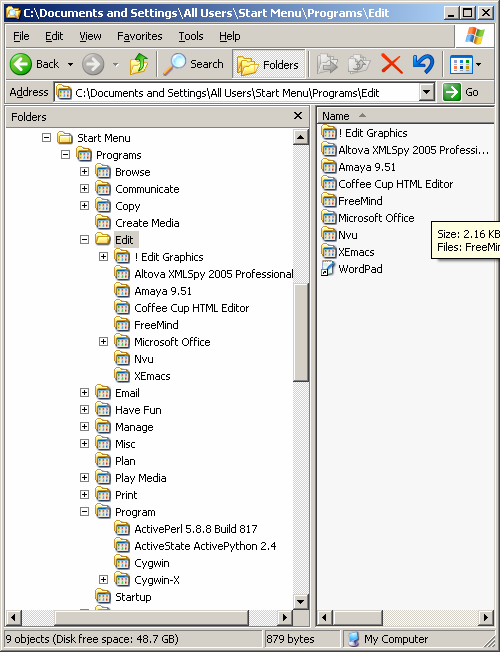 In this spirit, i decided to try an experiment with the Windows Start Menu of my new laptop. Since i had the previous one for three years, and my laptop has become the nexus of information management, i had a lot of programs installed: critical ones from work that i use every week, but also exploratory ones, and a host of personal applications as well. Of course, under Windows, every application wants to be at the top-level of your list of programs: but after a while, that leads to a menu so long it spills over into two or three columns. Worse, however, is that you have to find a program by know what it’s called: wouldn’t it be better to instead organize by what they do?
The screendump at left shows what i can up with: a set of about a dozen top-level task categories, with an occasional sub-category, and then programs arranged underneath. So the Edit category takes me to XMLSpy (an XML editor), several web editors, and a sub-category of graphics editors. Browse includes browsers like Firefox, but also a WordNet information browser. Communicate includes FTP, PuTTY, VNC, etc. Copy is an interesting category: it includes Sonic (for burning DVDs), and ReaderWare (you could argue this is a database application instead). Manage is a bit of a catch-all, with sub-categories for managing local services (Apache, wireless utilities, backup, etc.), local hardware (keyboard and mouse), and local data (Google Desktop, MySql, WinZip, etc.).
Of course, this isn’t completely neat and tidy. Though you can put things in multiple categories (they’re just shortcuts after all), some are a little difficult to categorize at all: for example, what’s the functional category for Cygwin? (i put it under Program) And Browse doesn’t really capture all the things i do with Firefox (but i get it off the frequently-used programs anyway). But it helps reinforce the notion of “what am i doing now”, and (perhaps implicitly) why?